Rule Validations & Error Handling
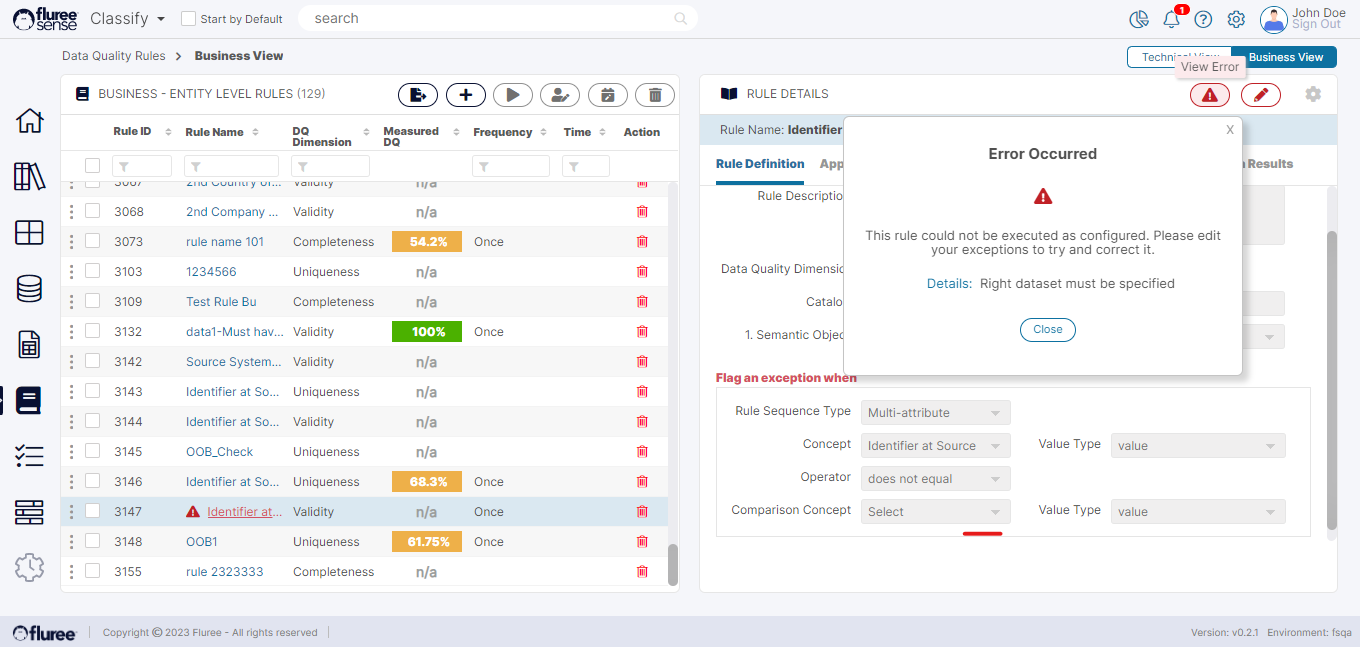
Fluree Sense also provides for rule validation in case a Rule fails to compile at run-time successfully during the Job processing. At the very basic level, a rule converts to a query or function so if for some reason that query fails or some other issue happens, the error information is provided to the user in the rule itself. A rule failing validation will appear with the following visual aids:
-
It will display its name in the grid in red font and an error symbol
-
It will show the error symbol & edit / eye glass in red as well
-
It will display the ‘Flag an exception when’ text in red.
-
Upon clicking the error symbol next to the Edit icon, it will display the error details.
A user can try to recover the rule from error by changing the exception condition or data columns / concepts if they feel that may be the cause of error. Rules which fail validation do not run for obvious reasons and display the score of the most recent successful run.